Word Finder Companion1.7.6
Publisher Description
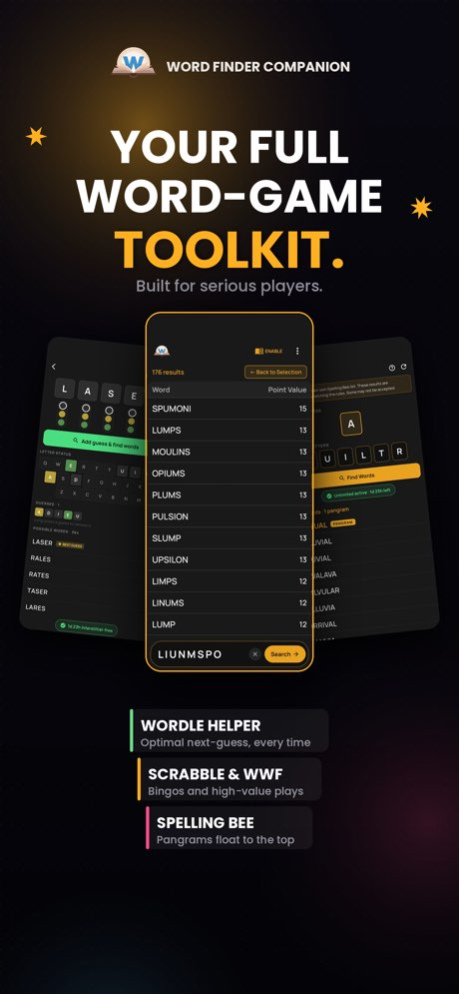
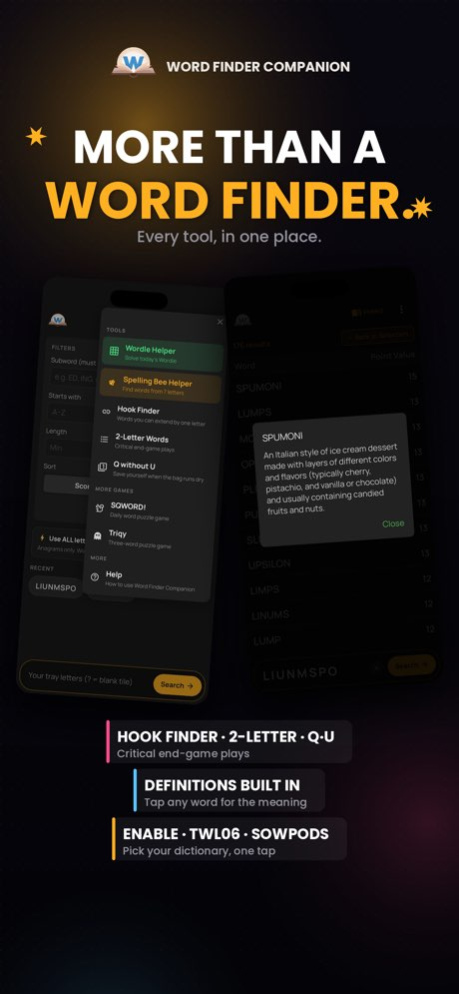
Word Finder Companion, Your Word Game Co-Pilot
Stuck mid-game? Hunting for the bingo? Or just trying to crack today's
Wordle? Word Finder Companion is the fastest, smartest way to find the
right word every time.
Built for tile-rack games, crossword grids, and daily word puzzles,
it's a full toolkit in one clean, distraction-free interface.
WHAT YOU CAN DO
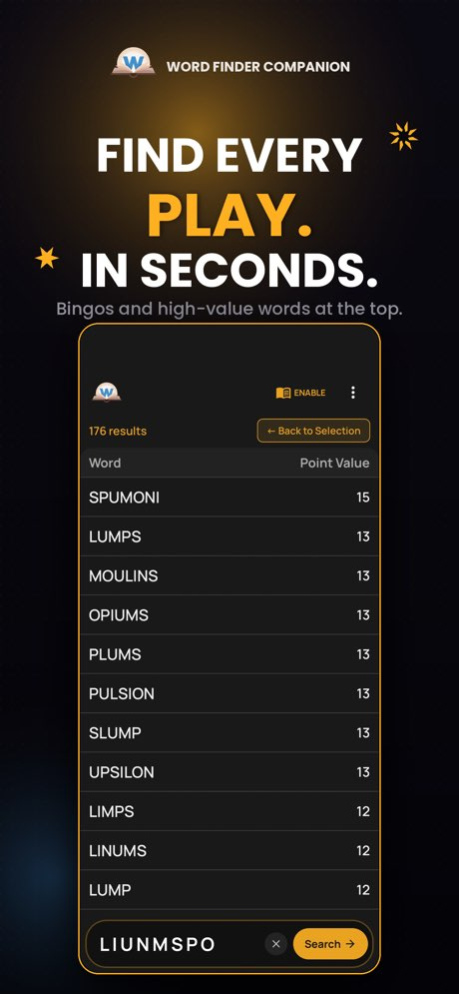
. Find every playable word. Type your tray letters (use ? for blanks)
and instantly see every legal word, ranked by score. Tap any word
for its definition.
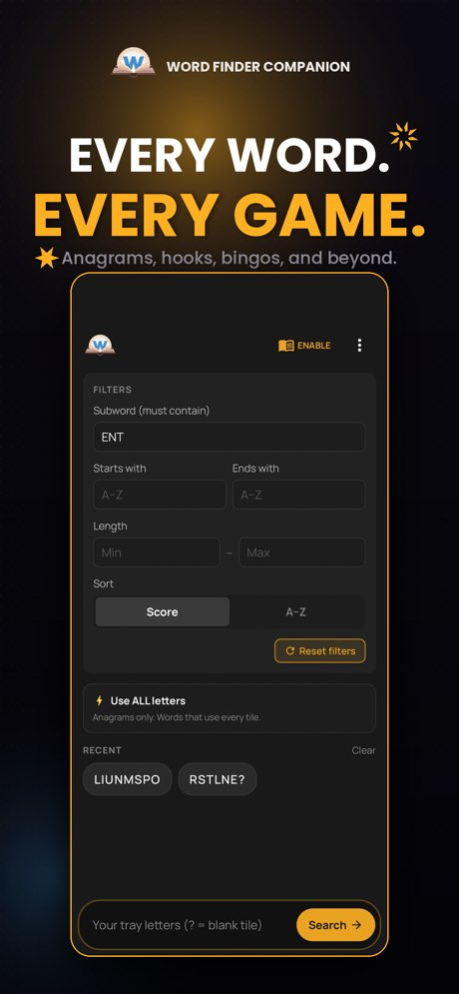
. Powerful filters - Starts with, ends with, must-contain, min/max
length, or "use all letters" for bingo-only results. Starts/ends
letters can come from the board, not just your rack, perfect for
plays that hook off existing tiles.
. BINGO highlighting - Words that use all 7+ tray letters get a BINGO
badge so you never miss the 50-point bonus.
. Wordle helper- Lock in greens, mark yellows and grays, get the
best guesses ranked by how many possibilities they eliminate.
. Hook finder - Find every letter you can add to a word to make a new
word. Perfect for parallel plays.
. Reference lists - Browse all 2-letter words and Q-without-U words
the plays that win tight endgames.
. Recent searches - Re-run any past tray with one tap.
. Clean dark interface - No clutter. No paywalls.
PERFECT FOR
Words With Friends, Scrabble, Wordfeud, Wordle, Crossplay, crosswords, anagram
puzzles, and word workouts.
Free to use. Lightweight. Fast.
Stop guessing. Start winning.
Version History Bug fixes and streamlining. 1.7.6 Jun 22 This release focused on the little things that make the app feel right.
The biggest fix: tap responsiveness after closing an ad. The lag is gone, so flipping between modules feels instant again.
Spelling Bee Helper is now completely unlimited and free for everyone. Search as much as you want.
We also moved the Clear Tray button onto the Filters box where it's bigger, easier to find, and pops in a warm marigold so you can't miss it.
Thanks for the feedback that shaped this update. More to come. 1.7.0 May 19 Helpful layout and bug fixes. Added a "Clear Tray" button in the filters box.
NEW: Spelling Bee Helper. Type your 7 letters and explicitly mark the
center letter. We'll list every word in your dictionary that fits the
rules, with pangrams highlighted at the top.
NEW: Dictionary picker. Match the game you're playing. Tap the book
icon at the top of the home screen to switch between ENABLE (Words With
Friends and most casual word games), TWL06 (Scrabble in North America),
or SOWPODS (Scrabble internationally).
Faster, smarter Wordle Helper. The solver now uses the official NYT
answer and guess lists, so suggestions are quicker and stop including
words Wordle would never accept.
Refreshed look. New header with the WFC logo, redesigned search bar
with marigold focus ring and a clear Search button, restyled Menu with
sections and subtitles, and a fresh "Back to Selection" button.
...and
More bug fixes!
Thanks for playing! 1.6.6 May 13 NEW: Spelling Bee Helper. Type your 7 letters and explicitly mark the
center letter. We'll list every word in your dictionary that fits the
rules, with pangrams highlighted at the top.
NEW: Dictionary picker. Match the game you're playing. Tap the book
icon at the top of the home screen to switch between ENABLE (Words With
Friends and most casual word games), TWL06 (Scrabble in North America),
or SOWPODS (Scrabble internationally).
Faster, smarter Wordle Helper. The solver now uses the official NYT
answer and guess lists, so suggestions are quicker and stop including
words Wordle would never accept.
Refreshed look. New header with the WFC logo, redesigned search bar
with marigold focus ring and a clear Search button, restyled Menu with
sections and subtitles, and a fresh "Back to Selection" button.
...and
More bug fixes!
Thanks for playing! 1.5.9 May 11 NEW: Spelling Bee Helper. Type your 7 letters and explicitly mark the
center letter. We'll list every word in your dictionary that fits the
rules, with pangrams highlighted at the top.
NEW: Dictionary picker. Match the game you're playing. Tap the book
icon at the top of the home screen to switch between ENABLE (Words With
Friends and most casual word games), TWL06 (Scrabble in North America),
or SOWPODS (Scrabble internationally).
Faster, smarter Wordle Helper. The solver now uses the official NYT
answer and guess lists, so suggestions are quicker and stop including
words Wordle would never accept.
Refreshed look. New header with the WFC logo, redesigned search bar
with marigold focus ring and a clear Search button, restyled Menu with
sections and subtitles, and a fresh "Back to Selection" button.
Bug fixes. Squashed an intermittent Menu freeze and fixed an issue
where the banner ad's close button and click-through weren't always
responsive.
Thanks for playing! 1.5.5 May 7 NEW: Spelling Bee Helper. Type your 7 letters and explicitly mark the
center letter. We'll list every word in your dictionary that fits the
rules, with pangrams highlighted at the top.
NEW: Dictionary picker. Match the game you're playing. Tap the book
icon at the top of the home screen to switch between ENABLE (Words With
Friends and most casual word games), TWL06 (Scrabble in North America),
or SOWPODS (Scrabble internationally).
Faster, smarter Wordle Helper. The solver now uses the official NYT
answer and guess lists, so suggestions are quicker and stop including
words Wordle would never accept.
Refreshed look. New header with the WFC logo, redesigned search bar
with marigold focus ring and a clear Search button, restyled Menu with
sections and subtitles, and a fresh "Back to Selection" button.
Bug fixes. Squashed an intermittent Menu freeze and fixed an issue
where the banner ad's close button and click-through weren't always
responsive.
Thanks for playing! 1.5.2 May 4 Completely redesigned the UI, added menu options & new filters, optimized searches, improved layout spacing, and gently squashed some bugs. 1.4.4 May 2 Completely redesigned the UI, added menu options, added new filters, optimized searches, and gently squashed some bugs. 1.3.4 May 1 Completely redesigned the UI, added menu options, added new filters, and optimized searches. 1.3.2 Apr 28 Streamlined the UI and implemented performance optimizations. 1.2.4 09/12/2025 Streamlined the UI and added a Menu button for some added Word Game help! 1.2.3 09/01/2025 We're always optimizing and streamlining your word finding experience! Also, fixed a tiny bug that was autocompleting words. 1.2.0 08/25/2025 We're always optimizing and streamlining your word finding experience! Also, fixed a tiny bug that was autocompleting words. 1.1.8 08/19/2025 We're always optimizing and streamlining your word finding experience! 1.1.7 08/17/2025 We're always optimizing and streamlining your word finding experience! 1.1.6 08/15/2025 We're always optimizing and streamlining your word finding experience! 1.1.5 08/12/2025 We're always optimizing and streamlining your word finding experience! 1.0.8 07/25/2025 1.0.7 07/23/2025
About Word Finder Companion
The company that develops Word Finder Companion is Marc Scapelitte. The latest version released by its developer is 1.7.6.
To install Word Finder Companion on your iOS device, just click the green Continue To App button above to start the installation process. The app is listed on our website since 2026-10-14 and was downloaded 0 times. We have already checked if the download link is safe, however for your own protection we recommend that you scan the downloaded app with your antivirus. Your antivirus may detect the Word Finder Companion as malware if the download link is broken.
How to install Word Finder Companion on your iOS device:
- Click on the Continue To App button on our website. This will redirect you to the App Store.
- Once the Word Finder Companion is shown in the iTunes listing of your iOS device, you can start its download and installation. Tap on the GET button to the right of the app to start downloading it.
- If you are not logged-in the iOS appstore app, you'll be prompted for your your Apple ID and/or password.
- After Word Finder Companion is downloaded, you'll see an INSTALL button to the right. Tap on it to start the actual installation of the iOS app.
- Once installation is finished you can tap on the OPEN button to start it. Its icon will also be added to your device home screen.
Program Details
System requirements
Download information
Pricing
Version History
version 1.7.6
posted on 2026-10-14
Version History Bug fixes and streamlining. 1.7.6 Jun 22 This release focused on the little things that make the app feel right.
The biggest fix: tap responsiveness after closing an ad. The lag is gone, so flipping between modules feels instant again.
Spelling Bee Helper is now completely unlimited and free for everyone. Search as much as you want.
We also moved the Clear Tray button onto the Filters box where it's bigger, easier to find, and pops in a warm marigold so you can't miss it.
Thanks for the feedback that shaped this update. More to come. 1.7.0 May 19 Helpful layout and bug fixes. Added a "Clear Tray" button in the filters box.
NEW: Spelling Bee Helper. Type your 7 letters and explicitly mark the
center letter. We'll list every word in your dictionary that fits the
rules, with pangrams highlighted at the top.
NEW: Dictionary picker. Match the game you're playing. Tap the book
icon at the top of the home screen to switch between ENABLE (Words With
Friends and most casual word games), TWL06 (Scrabble in North America),
or SOWPODS (Scrabble internationally).
Faster, smarter Wordle Helper. The solver now uses the official NYT
answer and guess lists, so suggestions are quicker and stop including
words Wordle would never accept.
Refreshed look. New header with the WFC logo, redesigned search bar
with marigold focus ring and a clear Search button, restyled Menu with
sections and subtitles, and a fresh "Back to Selection" button.
...and
More bug fixes!
Thanks for playing! 1.6.6 May 13 NEW: Spelling Bee Helper. Type your 7 letters and explicitly mark the
center letter. We'll list every word in your dictionary that fits the
rules, with pangrams highlighted at the top.
NEW: Dictionary picker. Match the game you're playing. Tap the book
icon at the top of the home screen to switch between ENABLE (Words With
Friends and most casual word games), TWL06 (Scrabble in North America),
or SOWPODS (Scrabble internationally).
Faster, smarter Wordle Helper. The solver now uses the official NYT
answer and guess lists, so suggestions are quicker and stop including
words Wordle would never accept.
Refreshed look. New header with the WFC logo, redesigned search bar
with marigold focus ring and a clear Search button, restyled Menu with
sections and subtitles, and a fresh "Back to Selection" button.
...and
More bug fixes!
Thanks for playing! 1.5.9 May 11 NEW: Spelling Bee Helper. Type your 7 letters and explicitly mark the
center letter. We'll list every word in your dictionary that fits the
rules, with pangrams highlighted at the top.
NEW: Dictionary picker. Match the game you're playing. Tap the book
icon at the top of the home screen to switch between ENABLE (Words With
Friends and most casual word games), TWL06 (Scrabble in North America),
or SOWPODS (Scrabble internationally).
Faster, smarter Wordle Helper. The solver now uses the official NYT
answer and guess lists, so suggestions are quicker and stop including
words Wordle would never accept.
Refreshed look. New header with the WFC logo, redesigned search bar
with marigold focus ring and a clear Search button, restyled Menu with
sections and subtitles, and a fresh "Back to Selection" button.
Bug fixes. Squashed an intermittent Menu freeze and fixed an issue
where the banner ad's close button and click-through weren't always
responsive.
Thanks for playing! 1.5.5 May 7 NEW: Spelling Bee Helper. Type your 7 letters and explicitly mark the
center letter. We'll list every word in your dictionary that fits the
rules, with pangrams highlighted at the top.
NEW: Dictionary picker. Match the game you're playing. Tap the book
icon at the top of the home screen to switch between ENABLE (Words With
Friends and most casual word games), TWL06 (Scrabble in North America),
or SOWPODS (Scrabble internationally).
Faster, smarter Wordle Helper. The solver now uses the official NYT
answer and guess lists, so suggestions are quicker and stop including
words Wordle would never accept.
Refreshed look. New header with the WFC logo, redesigned search bar
with marigold focus ring and a clear Search button, restyled Menu with
sections and subtitles, and a fresh "Back to Selection" button.
Bug fixes. Squashed an intermittent Menu freeze and fixed an issue
where the banner ad's close button and click-through weren't always
responsive.
Thanks for playing! 1.5.2 May 4 Completely redesigned the UI, added menu options & new filters, optimized searches, improved layout spacing, and gently squashed some bugs. 1.4.4 May 2 Completely redesigned the UI, added menu options, added new filters, optimized searches, and gently squashed some bugs. 1.3.4 May 1 Completely redesigned the UI, added menu options, added new filters, and optimized searches. 1.3.2 Apr 28 Streamlined the UI and implemented performance optimizations. 1.2.4 09/12/2025 Streamlined the UI and added a Menu button for some added Word Game help! 1.2.3 09/01/2025 We're always optimizing and streamlining your word finding experience! Also, fixed a tiny bug that was autocompleting words. 1.2.0 08/25/2025 We're always optimizing and streamlining your word finding experience! Also, fixed a tiny bug that was autocompleting words. 1.1.8 08/19/2025 We're always optimizing and streamlining your word finding experience! 1.1.7 08/17/2025 We're always optimizing and streamlining your word finding experience! 1.1.6 08/15/2025 We're always optimizing and streamlining your word finding experience! 1.1.5 08/12/2025 We're always optimizing and streamlining your word finding experience! 1.0.8 07/25/2025 1.0.7 07/23/2025
version 1.7.0
posted on 2026-06-11
Version History This release focused on the little things that make the app feel right.
The biggest fix: tap responsiveness after closing an ad. The lag is gone, so flipping between modules feels instant again.
Spelling Bee Helper is now completely unlimited and free for everyone. Search as much as you want.
We also moved the Clear Tray button onto the Filters box where it's bigger, easier to find, and pops in a warm marigold so you can't miss it.
Thanks for the feedback that shaped this update. More to come. 1.7.0 May 19 Helpful layout and bug fixes. Added a "Clear Tray" button in the filters box.
NEW: Spelling Bee Helper. Type your 7 letters and explicitly mark the
center letter. We'll list every word in your dictionary that fits the
rules, with pangrams highlighted at the top.
NEW: Dictionary picker. Match the game you're playing. Tap the book
icon at the top of the home screen to switch between ENABLE (Words With
Friends and most casual word games), TWL06 (Scrabble in North America),
or SOWPODS (Scrabble internationally).
Faster, smarter Wordle Helper. The solver now uses the official NYT
answer and guess lists, so suggestions are quicker and stop including
words Wordle would never accept.
Refreshed look. New header with the WFC logo, redesigned search bar
with marigold focus ring and a clear Search button, restyled Menu with
sections and subtitles, and a fresh "Back to Selection" button.
...and
More bug fixes!
Thanks for playing! 1.6.6 May 13 NEW: Spelling Bee Helper. Type your 7 letters and explicitly mark the
center letter. We'll list every word in your dictionary that fits the
rules, with pangrams highlighted at the top.
NEW: Dictionary picker. Match the game you're playing. Tap the book
icon at the top of the home screen to switch between ENABLE (Words With
Friends and most casual word games), TWL06 (Scrabble in North America),
or SOWPODS (Scrabble internationally).
Faster, smarter Wordle Helper. The solver now uses the official NYT
answer and guess lists, so suggestions are quicker and stop including
words Wordle would never accept.
Refreshed look. New header with the WFC logo, redesigned search bar
with marigold focus ring and a clear Search button, restyled Menu with
sections and subtitles, and a fresh "Back to Selection" button.
...and
More bug fixes!
Thanks for playing! 1.5.9 May 11 NEW: Spelling Bee Helper. Type your 7 letters and explicitly mark the
center letter. We'll list every word in your dictionary that fits the
rules, with pangrams highlighted at the top.
NEW: Dictionary picker. Match the game you're playing. Tap the book
icon at the top of the home screen to switch between ENABLE (Words With
Friends and most casual word games), TWL06 (Scrabble in North America),
or SOWPODS (Scrabble internationally).
Faster, smarter Wordle Helper. The solver now uses the official NYT
answer and guess lists, so suggestions are quicker and stop including
words Wordle would never accept.
Refreshed look. New header with the WFC logo, redesigned search bar
with marigold focus ring and a clear Search button, restyled Menu with
sections and subtitles, and a fresh "Back to Selection" button.
Bug fixes. Squashed an intermittent Menu freeze and fixed an issue
where the banner ad's close button and click-through weren't always
responsive.
Thanks for playing! 1.5.5 May 7 NEW: Spelling Bee Helper. Type your 7 letters and explicitly mark the
center letter. We'll list every word in your dictionary that fits the
rules, with pangrams highlighted at the top.
NEW: Dictionary picker. Match the game you're playing. Tap the book
icon at the top of the home screen to switch between ENABLE (Words With
Friends and most casual word games), TWL06 (Scrabble in North America),
or SOWPODS (Scrabble internationally).
Faster, smarter Wordle Helper. The solver now uses the official NYT
answer and guess lists, so suggestions are quicker and stop including
words Wordle would never accept.
Refreshed look. New header with the WFC logo, redesigned search bar
with marigold focus ring and a clear Search button, restyled Menu with
sections and subtitles, and a fresh "Back to Selection" button.
Bug fixes. Squashed an intermittent Menu freeze and fixed an issue
where the banner ad's close button and click-through weren't always
responsive.
Thanks for playing! 1.5.2 May 4 Completely redesigned the UI, added menu options & new filters, optimized searches, improved layout spacing, and gently squashed some bugs. 1.4.4 May 2 Completely redesigned the UI, added menu options, added new filters, optimized searches, and gently squashed some bugs. 1.3.4 May 1 Completely redesigned the UI, added menu options, added new filters, and optimized searches. 1.3.2 Apr 28 Streamlined the UI and implemented performance optimizations. 1.2.4 09/12/2025 Streamlined the UI and added a Menu button for some added Word Game help! 1.2.3 09/01/2025 We're always optimizing and streamlining your word finding experience! Also, fixed a tiny bug that was autocompleting words. 1.2.0 08/25/2025 We're always optimizing and streamlining your word finding experience! Also, fixed a tiny bug that was autocompleting words. 1.1.8 08/19/2025 We're always optimizing and streamlining your word finding experience! 1.1.7 08/17/2025 We're always optimizing and streamlining your word finding experience! 1.1.6 08/15/2025 We're always optimizing and streamlining your word finding experience! 1.1.5 08/12/2025 We're always optimizing and streamlining your word finding experience! 1.0.8 07/25/2025 1.0.7 07/23/2025
version 1.5.5
posted on 2026-05-08
Version History NEW: Spelling Bee Helper. Type your 7 letters and explicitly mark the
center letter. We'll list every word in your dictionary that fits the
rules, with pangrams highlighted at the top.
NEW: Dictionary picker. Match the game you're playing. Tap the book
icon at the top of the home screen to switch between ENABLE (Words With
Friends and most casual word games), TWL06 (Scrabble in North America),
or SOWPODS (Scrabble internationally).
Faster, smarter Wordle Helper. The solver now uses the official NYT
answer and guess lists, so suggestions are quicker and stop including
words Wordle would never accept.
Refreshed look. New header with the WFC logo, redesigned search bar
with marigold focus ring and a clear Search button, restyled Menu with
sections and subtitles, and a fresh "Back to Selection" button.
Bug fixes. Squashed an intermittent Menu freeze and fixed an issue
where the banner ad's close button and click-through weren't always
responsive.
Thanks for playing! 1.5.5 23h ago NEW: Spelling Bee Helper. Type your 7 letters and explicitly mark the
center letter. We'll list every word in your dictionary that fits the
rules, with pangrams highlighted at the top.
NEW: Dictionary picker. Match the game you're playing. Tap the book
icon at the top of the home screen to switch between ENABLE (Words With
Friends and most casual word games), TWL06 (Scrabble in North America),
or SOWPODS (Scrabble internationally).
Faster, smarter Wordle Helper. The solver now uses the official NYT
answer and guess lists, so suggestions are quicker and stop including
words Wordle would never accept.
Refreshed look. New header with the WFC logo, redesigned search bar
with marigold focus ring and a clear Search button, restyled Menu with
sections and subtitles, and a fresh "Back to Selection" button.
Bug fixes. Squashed an intermittent Menu freeze and fixed an issue
where the banner ad's close button and click-through weren't always
responsive.
Thanks for playing! 1.5.2 4d ago Completely redesigned the UI, added menu options & new filters, optimized searches, improved layout spacing, and gently squashed some bugs. 1.4.4 5d ago Completely redesigned the UI, added menu options, added new filters, optimized searches, and gently squashed some bugs. 1.3.4 6d ago Completely redesigned the UI, added menu options, added new filters, and optimized searches. 1.3.2 Apr 28 Streamlined the UI and implemented performance optimizations. 1.2.4 09/12/2025 Streamlined the UI and added a Menu button for some added Word Game help! 1.2.3 09/01/2025 We're always optimizing and streamlining your word finding experience! Also, fixed a tiny bug that was autocompleting words. 1.2.0 08/25/2025 We're always optimizing and streamlining your word finding experience! Also, fixed a tiny bug that was autocompleting words. 1.1.8 08/19/2025 We're always optimizing and streamlining your word finding experience! 1.1.7 08/17/2025 We're always optimizing and streamlining your word finding experience! 1.1.6 08/15/2025 We're always optimizing and streamlining your word finding experience! 1.1.5 08/12/2025 We're always optimizing and streamlining your word finding experience! 1.0.8 07/25/2025 1.0.7 07/23/2025
version 1.2.4
posted on 2025-09-12
Streamlined the UI and implemented performance optimizations.
